
Remote Play sounds perfect when you are an adult with a job, a family, and a console sitting in the other room. In practice, it only really works with the right games. Pick badly and you get tiny text, fiddly menus, long cutscenes, and combat that falls apart the second your connection hiccups. Pick well and you get something that fits into a lunch break, a couch session while someone else uses the TV, or 25 minutes in bed before you pass out.
The best console games to Remote Play on your phone are not always the biggest or the newest. They are the ones that survive a smaller screen, tolerate occasional input lag, and let you make real progress in short bursts. That matters more than graphics. It matters more than hype.
I’ve spent plenty of time trying games that looked great on paper and felt awful once they were shrunk to a phone screen. These are the ones I would actually recommend to a friend who wants to get value out of Remote Play instead of fighting with it.
Why Busy Players Should Care About This at All
If your gaming time is fragmented, Remote Play can turn dead time into actual progress. Not fake progress. Real stuff. A dungeon run in Diablo IV. A couple of contract missions in Hitman. A race series in Forza Horizon 5. One chapter in Like a Dragon.
That is the appeal.
You do not need to wait for the TV. You do not need to commit to a full evening. You can chip away at games that would otherwise sit untouched for weeks.
But there is a catch. Remote Play is unforgiving about bad fit. Anything that relies on split-second parries, tiny UI, or long stretches where you cannot save is a bad match. So are games that waste your first 10 minutes every session on setup, travel, or story recap. If you are already short on time, those little bits of friction add up fast.
The goal here is simple. Find console games that still feel good on a phone and still respect your time.
The Console Games That Actually Work Well on a Phone
Diablo IV
This is one of the easiest recommendations. Diablo IV works on Remote Play because the loop is clean, readable, and forgiving. You can log in, clear a dungeon, knock out a couple of Tree of Whispers objectives, sort your gear, and log off. That is a real session.
It also helps that the controls translate well to a phone mount and controller. You are not trying to line up precise headshots or read tiny inventory tabs every second. Most of your time is spent moving, using cooldowns, vacuuming up loot, and making broad build decisions.
For busy players, the sweet spot is the campaign, Helltides once you know what you are doing, and Nightmare Dungeons in moderate doses. The campaign stays focused for a while. Helltides are great if you have 20 to 30 minutes and want a clear objective. Nightmare Dungeons are worth doing if you enjoy tuning a build.
What is not worth chasing on your phone is obsessive inventory management or long comparison sessions over tiny stat bumps. That gets old fast on a small screen. Play the action. Save the fussy cleanup for the TV.
Forza Horizon 5
If you want something that feels instantly good, this is near the top. Forza Horizon 5 is excellent for Remote Play because each race or stunt is self-contained, the visual readability is strong even on a smaller screen, and the game is generous about quick fun. You can do a street race, a danger sign, a seasonal challenge, or just drive around Mexico for 15 minutes and still feel like you played something.
The big reason I recommend it is momentum. There is almost no startup drag. You pick an event and go. That matters a lot when your free time is short.
The best use of your time here is the main Horizon stories early on, regular race events, and seasonal playlist tasks if you like having structure. The Horizon Adventure unlocks come fast enough to keep things moving. The game starts strong and, unlike a lot of open-world games, it stays useful in small doses.
What slows down later is completionist stuff. Hunting every board, every road, every tiny checklist item is only worth it if you genuinely love the map. Otherwise, just race.
Hitman World of Assassination
This is probably the smartest Remote Play game if you like stealth and problem solving. Hitman works because each map is basically a self-contained sandbox, and the mission stories give you clean ways to make progress without needing perfect twitch aim. Dartmoor, Miami, Sapienza, Berlin, Dubai. These are fantastic on a phone because the core play is observation, timing, disguise management, and route planning.
You can spend 20 minutes setting up one clean assassination and be done. That is a great use of limited time.
The mission story system also helps a lot on a small screen. Following a guided opportunity to poison a target, arrange an accident kill, or infiltrate a restricted area gives you enough structure that you do not feel lost. Then, when you know a map better, you can improvise.
The only warning is text size and menu clutter. The planning screens and challenge menus are not where this game shines on a phone. The actual missions are the point. Do those. Ignore the urge to stare at every mastery unlock while squinting at your screen.
Like a Dragon: Infinite Wealth
Turn-based RPGs are naturally good for Remote Play, and Infinite Wealth is one of the better modern examples because the fights are readable, the pacing is broken into useful chunks, and there is always something low-pressure to do. Story scenes can run long, yes, but the actual combat is ideal for a phone. A little lag barely matters.
This is especially good if your real gaming life is chaotic because you can do one or two substories, a few battles, maybe some Dondoko Island tasks if you are in the mood, and stop without losing the thread.
My honest advice is to focus on the main story, the better substories, and the personality-building side content tied to your party. The Sujimon stuff is fun longer than it should be, but it can absolutely become a time sink. Dondoko Island is charming, though it is only worth going deep on if you really click with the Animal Crossing-style loop. If not, sample it and move on.
This is a good Remote Play game because it bends around your schedule. Just be aware that story-heavy stretches are better when you are settled, not when you have 12 distracted minutes.
Balatro
Yes, this is on consoles, and yes, it is one of the best things you can stream to your phone if you want pure efficiency. Balatro is almost unfairly good for Remote Play. The controls are simple, the sessions are compact, and the game gives you immediate decisions with almost no wasted motion.
If you have 15 or 20 minutes, this is perfect. One run can be a full session. You are making clear choices constantly, and you never have to remember some giant quest log when you come back later.
The tradeoff is obvious. It is extremely easy to say you will do one run and then lose an hour. So it is good for busy adults, but only if you are honest with yourself. If you want a hard stop, set one.
Persona 5 Royal
This is a strong pick with one important condition. It is best if you already know you like Persona. The day-by-day structure, palace infiltration, Mementos runs, Confidant ranks, classroom questions, and evening planning all break into neat chunks that work surprisingly well on a phone. You can advance a palace route, spend time with Takemi or Sojiro, fuse Personas, and save.
Where it gets rough is the sheer length. This game is excellent in pieces, but it is still huge. If you are hoping Remote Play will somehow make a 100-plus-hour RPG feel short, it will not. It just makes it easier to keep moving.
For time-conscious players, the best approach is to prioritize core Confidants that actually help in play, like Kawakami, Chihaya, and your party members, and not stress over perfect optimization. You do not need to wring every stat point out of every calendar day. That way lies burnout.
Slay the Spire
Another obvious but completely correct recommendation. Slay the Spire is excellent on Remote Play because every run is self-contained, every decision matters, and input lag is basically irrelevant. It is clean, readable, and easy to resume mentally after a day or two away.
It is also one of the best options if you are sharing attention with real life. You can pause instantly. You can think for a second. You are never trapped in a 25-minute cutscene or a boss fight that punishes one bad connection spike.
If your main goal is getting quality gaming in small windows, this is hard to beat.
What You Can Skip Without Missing Much on Remote Play
First, most competitive shooters. Call of Duty multiplayer, Apex Legends, Rainbow Six Siege. You can technically do it. You probably should not. Input lag, small targets, and unstable connections turn these into frustration machines. If you are very casual and just want to mess around, fine. If you want a good use of your time, skip them.
Second, Soulslikes and games built around tight defensive timing. Elden Ring is amazing. It is not one of the best Remote Play games on a phone unless your setup is unusually stable and you already know what you are doing. Exploration is fine. Bosses are another story. You will feel every bit of delay.
Third, giant menu-heavy strategy games with tiny text. Crusader Kings III on console, Cities: Skylines, even parts of Civilization VI depending on your tolerance. These can work on a tablet. On a phone, they become chores.
Fourth, story games with long uninterruptible scenes if your sessions are short. Something like Metal Gear Solid 4 style pacing is the nightmare scenario for Remote Play. You sit down for 20 minutes and spend 18 of them watching. That is not what you are here for.
And finally, be careful with open-world games that front-load travel. Assassin’s Creed Valhalla is the kind of game that sounds useful for Remote Play and then quietly eats your time with riding, map clutter, and repetitive cleanup. If you love the setting, sure. If you want efficient progress, there are better options.
How to Get More Out of These Games Without Wasting Time
Use Remote Play for games with short loops and clear stopping points. That is the main rule.
In Diablo IV, decide before you start whether you are doing a Helltide, a dungeon, or gear cleanup. In Hitman, load into one map with one assassination idea. In Forza Horizon 5, pick a race type or a seasonal objective. In Persona 5 Royal, choose whether the session is for palace progress, Mementos, or Confidants. One lane. Not five.
Also, do your admin on the big screen when possible. Skill trees, gear comparison, challenge tracking, and deep inventory sorting are where phone play becomes annoying. Save your Remote Play time for actual play.
And be realistic about your setup. A controller clip changes everything. Touch controls are fine for slower games, but for most console titles, a proper controller is the difference between useful and miserable. Good Wi-Fi matters too, obviously, but the bigger issue is often where you are sitting. One bad room in the house can ruin the whole idea.
Handhelds Are Still Better for Some People


If you have a dedicated handheld like a Steam Deck, Logitech G Cloud, or a phone with a proper controller attachment, this whole category gets better. The bigger screen helps with UI-heavy games. The grip helps with longer sessions. And the experience feels less like you are improvising and more like you are actually playing.
That said, the appeal of phone Remote Play is convenience. You already own the phone. You already own the console. No extra device needed.
My practical take is this. If you mostly want 15 to 30 minute sessions around the house, a phone is enough for the right games. If you want to spend hours this way, or you keep bouncing off because text is too small, a handheld setup is worth considering. It removes just enough friction that you will use it more.
If You Only Have 20 Minutes, Do This
Play one Diablo IV dungeon or a quick Helltide loop.
Run one Hitman mission story step or one focused assassination attempt.
Do two or three Forza Horizon 5 races or a seasonal challenge.
Make one meaningful day of progress in Persona 5 Royal. A Confidant hangout, a Mementos push, or a palace route.
Do one Balatro or Slay the Spire run if you want the cleanest, least messy answer.
That last category is honestly the best fit for truly short sessions. Roguelikes and card games waste almost none of your time. Big RPGs and open-world games can work, but only when you are disciplined about what the session is for.
The Best Use of Your Time, Plain and Simple
If you want the safest recommendations, start with Diablo IV, Forza Horizon 5, Hitman World of Assassination, and Slay the Spire. Those are the games that most consistently survive the jump to a phone without turning into compromise machines.
If you want something meatier, go with Like a Dragon: Infinite Wealth or Persona 5 Royal, but only if you accept that these are long-haul games. Remote Play makes them manageable. It does not make them short.
The mistake is assuming any good console game is automatically a good phone Remote Play game. It is not. The best picks are the ones that let you get in fast, do something satisfying, and stop cleanly. That is what busy adults actually need.
So be picky. Choose games with strong short-session loops, readable screens, and low punishment for small connection issues. Skip the stuff that demands perfect timing or constant menu squinting.
Your time is limited. Your Remote Play library should act like it knows that.

About the Author
Robert Davis may be middle-aged now, but he has always enjoyed playing video games. Just like others may like to curl up with a good book, he just prefers a different medium for story-telling. Now that life is much busier, he has to be choosy about which games he spends time on. And that's why Delayed Respawnse exists, because he's not the only one.
View all posts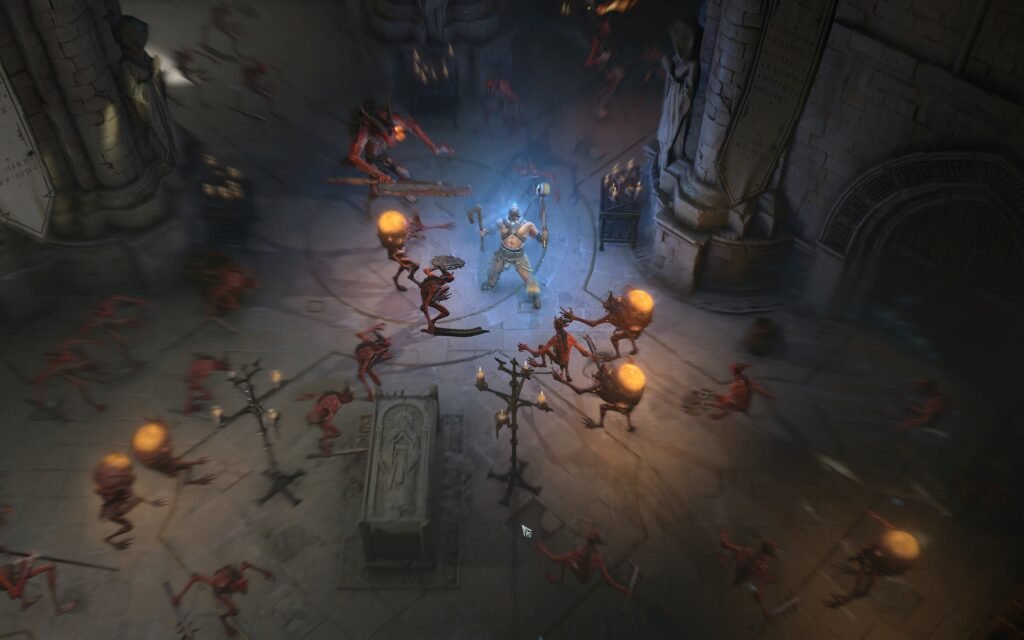
Quick Points
- Pick games with short loops, not giant setup time
- Best bets are Diablo IV, Forza Horizon 5, Hitman, and Slay the Spire
- Skip competitive shooters and most Soulslikes on phone Remote Play
- Do inventory and menu cleanup on the TV, not your phone